Project
Bulk AI Image Generator
Turn a list of ideas into a library of ready-to-use images. Automatically, for about a penny each.
Every business needs fresh visuals: blog headers, social posts, service pages, ads, Google Business Profile updates. Getting them usually means hours of stock-photo browsing, back-and-forth with a designer, or typing prompts into an AI tool one image at a time.
We built a system that does it for you. Type your topics into a spreadsheet, press one button, and come back to a folder of finished images.
How it works (the short version)
-
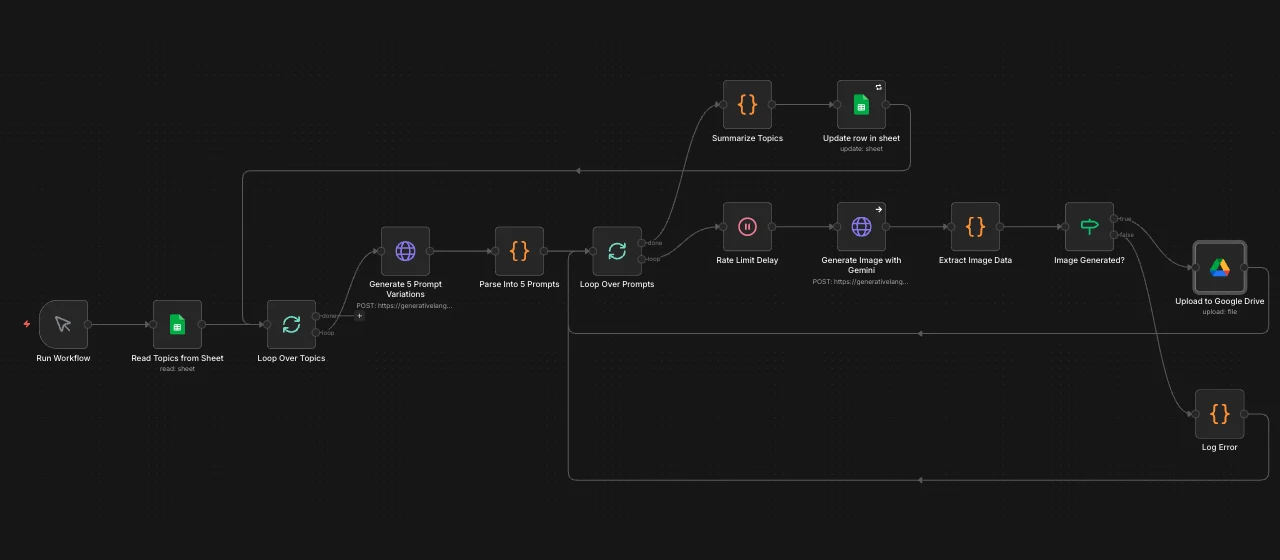
You list your topics in a simple Google Sheet, one idea per row. "Cozy coffee shop on a rainy morning." "Physiotherapist helping a runner stretch." "Modern laneway home at dusk."
-
AI writes the creative brief. For each topic, the system writes five different image concepts: different styles, angles, moods and lighting. You get real variety, not five copies of the same picture.
-
AI creates the images. Each concept becomes a finished image.
-
Everything lands in your Google Drive. Neatly named and organized by topic, and your spreadsheet updates itself so you can see what's done.
That's it. No design software, no prompt-writing skills, no copying and pasting.
Why it matters
Hours back every week
What used to take an afternoon of searching, prompting and downloading now runs on its own while you do something else. Ten topics means fifty images, with no extra effort from you.
About 1¢ per image
Compare that to stock-photo subscriptions, per-image licensing, or design hours. Even a big batch of a few hundred images costs less than a coffee meeting.
Built to scale
One topic or one hundred, the process is the same: add rows, press go. It's ideal for agencies, multi-location businesses, or anyone publishing content on a regular schedule.
Variety built in
Five distinct takes on every topic, from photorealistic and illustrated to moody or bright and airy, so you can pick the image that fits the page instead of settling for whatever turned up.
Original images, not stock
The images are made fresh for you, so you won't see the same photo on a competitor's website. That's better for your brand, and better for standing out in search and social.
Runs on tools you already use
Google Sheets in, Google Drive out. No new platform to learn, and your team can add topics from anywhere.
Who it's for
- Local businesses that need a steady flow of visuals for their website, Google Business Profile and social channels
- Content and SEO teams producing blog posts and landing pages at volume
- Agencies managing visuals for several clients at once
- Anyone tired of paying for stock photos that look like stock photos
Results at a glance
| Before | With the generator | |
|---|---|---|
| Time per batch of 50 images | Several hours | A few minutes of setup |
| Cost per image | $1–$15+ (stock or design) | About 1¢ |
| Variety | Whatever stock libraries have | 5 custom concepts per topic |
| Organization | Downloads folder chaos | Named, sorted, tracked in Drive |
Get the workflow (free download)
Want to run it yourself? We're sharing the automation template we built. It runs in n8n, a free, open-source automation tool, and connects to Google Sheets, Google Drive and Google's Gemini AI.
What's included:
- The complete workflow file, ready to import into n8n
- Setup notes inside each step
- The spreadsheet column layout: topic, status, images_generated, last_run
What you'll need: an n8n account (self-hosted or cloud), a Google account, and a Gemini API key with billing turned on (image generation isn't on Google's free tier).
Download the workflowGet the free workflow
Tell us where to send updates and the download starts right away.
One email when the workflow gets an update. Unsubscribe anytime.
Rather have us set it up?
We'll configure it for your business: connected to your accounts, tuned to your brand's style, and producing images for your website, Google Business Profile and social channels.
Book a free consult